Generate customised quotes in seconds.
With this free Holded tool you can create and send customised quotes.
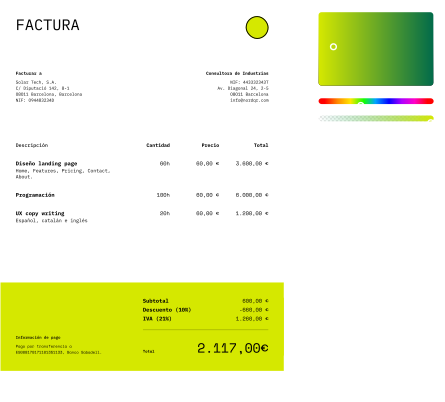
How does Holded's quote creator work?
1.Customise the design
You can customise it by adding your logo and corporate colours. Faster than designing it by hand.
2.Fill in the necessary information
You need your tax details, your client's details and the information about your products or services to invoice.
3.Save and send from Holded
Send the invoice through the Client Portal within Holded by creating a free account. Quick and easy.
What they say about us
Rating 4,2 / from 2.200 reviews on Trustpilot
Frequently asked questions
A quote is a document issued by a business or professional that details the estimated cost of a product or service before making a sale or hiring. Its purpose is to inform the client about the price, conditions and scope of the work to be carried out, enabling them to make an informed decision. Additionally, the quote serves as a preliminary agreement between both parties, avoiding misunderstandings about prices and service conditions. For businesses, it is a key tool for establishing a transparent and professional relationship with clients, helping to manage expectations and formalise the commercial proposal before closing a deal.
Yes, this Holded tool allows you to convert a quote (whether approved or not) into an invoice with a simple click. You will find the option inside the quote at: Convert > Invoice. You can also convert the document into a sales receipt or purchase order following the same procedure.
Yes, with this Holded tool you can include taxes in your quotes. Specifically, you can include the applicable VAT percentage and the corresponding IRPF withholding type. As for discounts, there is no dedicated field, but you can include them in the description itself by indicating them properly and using a negative figure.
Once your quote is created, you can send it directly to the client from the Holded tool. In fact, you have several options: 1. Send the quote to the client's email by clicking the blue Send button. 2. Share the link with your clients so they can view the document in the Client Portal. 3. Copy the link and send it to the client through any communication channel. This link will be valid for 48 hours, allowing clients to access the Portal without needing to set a password. 4. Download the quote in PDF format and send it directly to the client.
Ready to invoice faster?
Create, send, and get paid with professional invoices in minutes. No credit card required.
 Start free with Google
Discover everything Holded can do for your business
Beyond invoicing: accounting, treasury, CRM, projects and more, all in one platform designed for SMEs and freelancers.
Invoicing software
Recurring invoices, quotes, e-invoicing and tax compliance, everything to get paid on time.
Learn moreAccounting software
Automate bookkeeping, bank reconciliation and VAT reports with accounts closed in real time.
Learn moreTreasury software
See cash flow at a glance, forecast liquidity and keep every bank account in sync.
Learn moreCRM software
Track leads, manage your sales pipeline and follow up contacts without leaving Holded.
Learn moreProject management
Plan tasks, log hours and invoice projects directly from the same workspace.
Learn moreHR management
Manage teams, contracts, time tracking and payroll-ready data in one place.
Learn moreInventory management
Real-time stock control across warehouses, with purchase orders and supplier tracking.
Learn moreERP for SMEs
The all-in-one ERP: accounting, invoicing, CRM, projects, HR and inventory in a single platform.
Learn more