Manage absences and holidays without the hassle
Your team requests time off from their portal. You approve with one click. The calendar updates automatically.
Try Holded free for 14 days. No credit card required.
Over 200,000 businesses trust Holded


How absence management works
From request to team calendar, four simple steps.
Employee requests
Team members submit holiday or absence requests from their portal.
Manager approves
You review the request and approve or decline it with one click.
Calendar updates
Approved absences appear on the team calendar automatically.
Team visibility
Everyone can see who's available and plan workload accordingly.
Holiday requests
No more emails or spreadsheets for time-off requests
Employees request holidays, sick leave or personal days from their portal. You get a notification and approve or decline instantly.
Self-service requests
Employees see their available balance, pick their dates and submit a request, all from their portal. No emails needed.
Instant approval workflow
Receive a notification when someone requests time off. Approve or decline with one click and the employee is notified immediately.
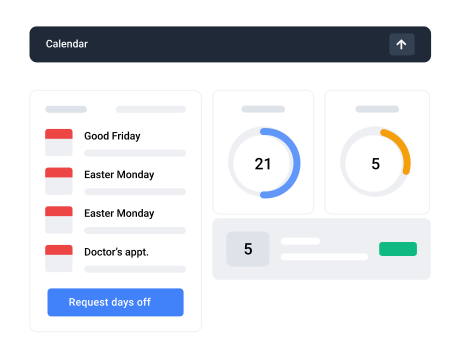
Team calendar
See your entire team's availability at a glance
A shared calendar shows who's on holiday, on leave or available. Plan workload without surprises and avoid scheduling conflicts.
Visual availability
Colour-coded calendar shows holidays, sick leave and other absences for every team member. Spot overlaps instantly.
Workload planning
Know who's available before assigning tasks or scheduling meetings. No more last-minute surprises.
Everything you need for absence management
Absence types
Configure holidays, sick leave, personal days, maternity and any custom type.
Leave balance
Employees see how many days they have left. Balances update automatically.
Custom policies
Set different rules per team, department or contract type.
Overlap detection
Get warned when too many people from the same team request the same dates.
Mobile access
Request and approve absences from your phone. Works on any device.
Absence reports
Analyse absence patterns by team, type or period. Export for HR reviews.
“We used to manage holidays with a shared spreadsheet. Now everyone requests from their portal and I approve in seconds. It's been a huge time saver.”
Ana P.
Operations Manager, 30-person company
Frequently asked questions
Yes. You can configure holidays, sick leave, personal leave, maternity, paternity and any custom absence type. Each type has its own rules and calendar colour.
Yes. Each employee can check their available days from their portal. Balances update automatically when requests are approved.
Yes. The team calendar shows who is on holiday, on leave or available, colour-coded for easy scanning.
Yes. You can configure different leave allowances and rules per team, department or contract type.
Yes. Holded alerts you when too many people from the same team request the same dates, so you can make informed decisions.