How to Create an Invoice: Checklist to Get Paid Faster

·
March 2, 2026
Summarize with ChatGPT

Are you having invoice issues? Late payments becoming a normality? It's unfortunately a frustrating reality for many small business owners. It's reported that 64 percent of small business have unpaid invoices more than 60 days old, I bet you're asking … can I change this reality? Having a well prepared and structured invoicing system may just be the key.

When you send a bill to a client, you want to make an impression. The invoice needs to look great, and it needs to display clearly the invoicing information in a professional and accessible way.It's important to note: having a smart invoicing process strategy will make cash flow problems a thing of the past. Consider the following when creating your strategy;

  • You will need to set invoice terms and take them seriously, make a point of getting your client to agree to them and honour them.
  • Do NOT delay, invoice your client when you agreed that you would.
  • Keep accurate record. Invoicing becomes much easier when you know exactly what you're charging for.

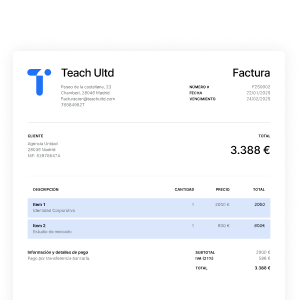
So, how can you create invoices and get paid faster?Every invoice is the same right? Well, not quite. There are a few requirements that go into creating the perfect invoice – one that will get you paid on time! Here's what you need to include:

  1. Number each one

Every invoice should have a unique identifier to help you track what has been paid and what's outstanding.

  1. Include the PO number (if applicable)

If you're dealing with a larger client, you'll definitely be aware of the purchase order (PO). Be sure to obtain this from your client as soon as possible and include it in your invoice so they can process it quicker.

  1. Provide detailed information about your product/service

Be sure to include the details of the project, the date the project was completed, the total cost (including applicable taxes), and any additional services that were requested by your client.

  1. If you can itemise, then do it

If the project involved sub-parts or additional add-ons, you could break these down and highlight what each sub-part was worth. This helps demonstrate the value you delivered.

  1. Attach the original signed contract

If you're invoicing a client for the first time, it's worth attaching the original signed contract or statement of work, just to be completely transparent.

  1. Offer online payment

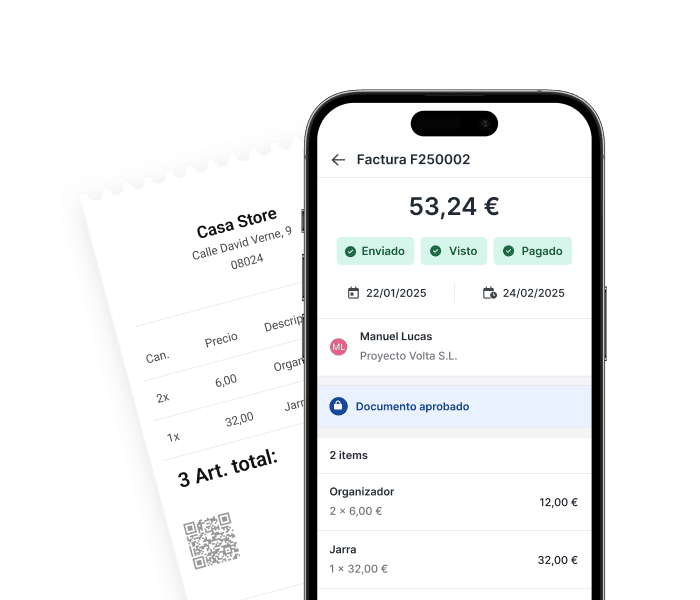
Online payments are a part of our daily consumer lives; everyone is familiar with how to purchase something online. Naturally, business who offer online payment are more likely to get paid earlier.Smart invoicing isn't rocket-science, and it's something all business owners, large or small, can integrate into their business processes. As your business is growing, consider an online accounting system that can save you time. Holded's Invoicing software allows you to customise your invoices to suit your needs, send them in a few easy steps and receive payment online.

Frequently Asked Questions

{{faq-1}}

{{faq-2}}

{{faq-3}}

{{faq-4}}
Featured articles
Summarize with AI
Resumir con IA: ChatGPT
Make business simple
Create and send invoices in seconds. Automate the tasks that take your time.
Try Holded for free

Latest articles

FAQ 1
{{faq-1}}
What information must be included on every invoice?
Every invoice requires a unique identifier number, detailed product or service descriptions with completion dates, total cost including taxes, and your business contact information. If working with larger clients, include their purchase order (PO) number to speed up processing.
FAQ 2
{{faq-2}}
How can I get clients to pay invoices faster?
Set clear payment terms upfront and get client agreement, send invoices immediately when due, offer online payment options, and keep accurate records of all work completed. Attaching the original signed contract on first invoices also increases transparency and payment speed. If you use invoicing software like Holded, you can streamline this workflow by creating sales invoices from Ventas > Facturas > Nueva factura with itemized concepts (units, price, taxes), choosing a payment method, and then sending the invoice from the invoice detail with the “Enviar” option (by email or post).
FAQ 3
{{faq-3}}
Should I itemize services on my invoices?
Yes, breaking down projects into sub-parts and add-ons demonstrates the specific value you delivered to clients. Itemization makes invoices clearer and helps clients understand exactly what they're paying for, which can reduce payment delays.
FAQ 4
{{faq-4}}
Why does each invoice need a unique number?
Unique invoice numbers help you track which invoices have been paid and which remain outstanding. This numbering system is essential for maintaining accurate financial records and following up on late payments systematically.
Default.
En las importaciones, cualquier banner que no tenga una categoría usará este banner.
{{banner-default-1}}
Facturación
{{banner-facturacion-1}}
Contabilidad
{{banner-contabilidad-1}}
CRM
{{banner-crm-1}}
Inventario
{{banner-inventario-1}}
Proyectos
{{banner-proyectos-1}}
Ventas
{{banner-ventas-1}}
RRHH
{{banner-rrhh-1}}
Sobre Holded
{{banner-sobre-holded-1}}
Noticias
{{banner-noticias-1}}
Asesorías y Gestorías
{{banner-asesorias-1}}
PYMES
{{banner-pymes-1}}
Autónomos
{{banner-autonomos-1}}
Facturación electrónica
{{banner-facturacion-electronica-1}}
Kit Digital
{{banner-kit-digital-1}}
Digitalización
{{banner-digitalizacion-1}}
Verifactu
{{banner-verifactu-1}}
Custom #1
{{banner-custom-1}}
Custom #2
{{banner-custom-2}}